

Every part of a piece of furniture starts as a line in the cutting list. If that line is wrong — a dimension, the grain, an edge — the mistake travels from the panel saw to the edgebander and from the edgebander to assembly, and you pay for it in board, in time and in re-cut parts.
The good news is that a good cutting list is no mystery: it just needs the right data, and the whole workshop has to read it the same way. This guide explains what that data is, the five mistakes that ruin the most parts, and when it is worth moving from a spreadsheet to optimisation software that handles the difficult cases on its own: parts too small for the edgebander and fronts that need continuous grain.
A cutting list and a cutting plan are not the same thing
Two things are often confused:
- The cutting list says which parts have to be cut: each part with its dimensions, material, grain and edges.
- The cutting plan (the optimisation) says how those parts are laid out on each board and in which order they are cut.
The list comes first, then the optimisation. A perfect cutting plan built on a bad list only helps you cut the wrong parts faster.
The data that cannot be missing
| Data | Why it matters |
|---|---|
| Part ID | So everyone knows which part is which at the edgebander, at the CNC and at assembly |
| Description and cabinet | “Left side panel of the sink unit”: the fitter should not have to guess |
| Material and thickness | Parts are grouped by material and thickness, and each group is optimised separately |
| Length and width | The finished size of the part, always with the same criterion |
| Quantity | How many identical parts have to be cut |
| Grain direction | On boards with a wood-grain decor, the grain cannot be rotated |
| Edges per side | Which sides are edged and with which edgeband |
On top of that there is a rule that does not belong to any program but to the whole wood industry, in Spain, Italy, France or Germany: the first dimension is always the one that runs with the grain. That way, whoever reads the list — and the program that optimises it — knows without any doubt how each part sits on the board.

The 5 mistakes that ruin the most parts
1. Mixing finished sizes and cutting sizes
If some people write down the size the part will have in the cabinet and others the size it is cut to, the mistake does not show up at the panel saw: it shows up at assembly, when the part does not fit. The list must always carry the finished size, and the whole workshop must know it.
2. Forgetting the grain
A front with the grain turned the wrong way is visible at a glance and cannot be fixed: it has to be cut again. If the list does not say how the grain runs, the optimiser or the operator may rotate the part to make better use of the board. And on fronts that sit one above the other, it is not enough for the grain to run the right way: it has to continue from one front to the next.
3. Not stating the edges side by side
“Edged” is not enough. The edgebander needs to know which sides are edged and with which edgeband. Otherwise it is guesswork, and a part edged on the wrong side goes back to the panel saw.
4. Copying the list by hand
Every time someone retypes a list there is a chance of error: a swapped number, a skipped line. The list should come straight from the design, without anyone copying it.
5. Unidentified parts
An order contains parts of identical size that belong to different cabinets. If they are not identified, they get mixed up on the trolley, and at assembly nobody knows which is which.
Spreadsheet or optimisation software?
For a single piece of furniture, a well-organised spreadsheet can do the job. For production, it falls short:
- It does not optimise: laying parts out on the board by hand leaves more waste than necessary.
- It does not protect the grain: nothing stops a part from being rotated.
- It does not handle the difficult cases: it does not know which parts are too small for the edgebander or which fronts have to come out with continuous grain.
- It does not reach the machine: the operator has to key the sizes into the panel saw by hand.
- It does not identify the parts: there are no labels, and at assembly it is guesswork.
Cutting optimisation software groups parts by material and thickness, lays them out to make the most of each board, respects the grain, deducts the saw blade thickness at every cut, uses offcuts and generates the cutting sequence for the panel saw.
How MobiCut solves it
MobiCut is MobiTech's cutting optimiser for panel saws:
- Receives the cutting list straight from TopSolid'Wood. When there is no CAD project, the list is created by hand with assisted designation (P001, P002…).
- The first dimension is the grain, and the engine never rotates parts against it. Available offcuts in stock are offered before new boards are opened.
- Prints each part's QR label, so nobody has to guess at assembly.
- Generates your panel saw program: Homag, Biesse, SCM and Striebig.
- Before cutting, the simulation shows the whole cycle on screen: trim, strips and cross cuts.
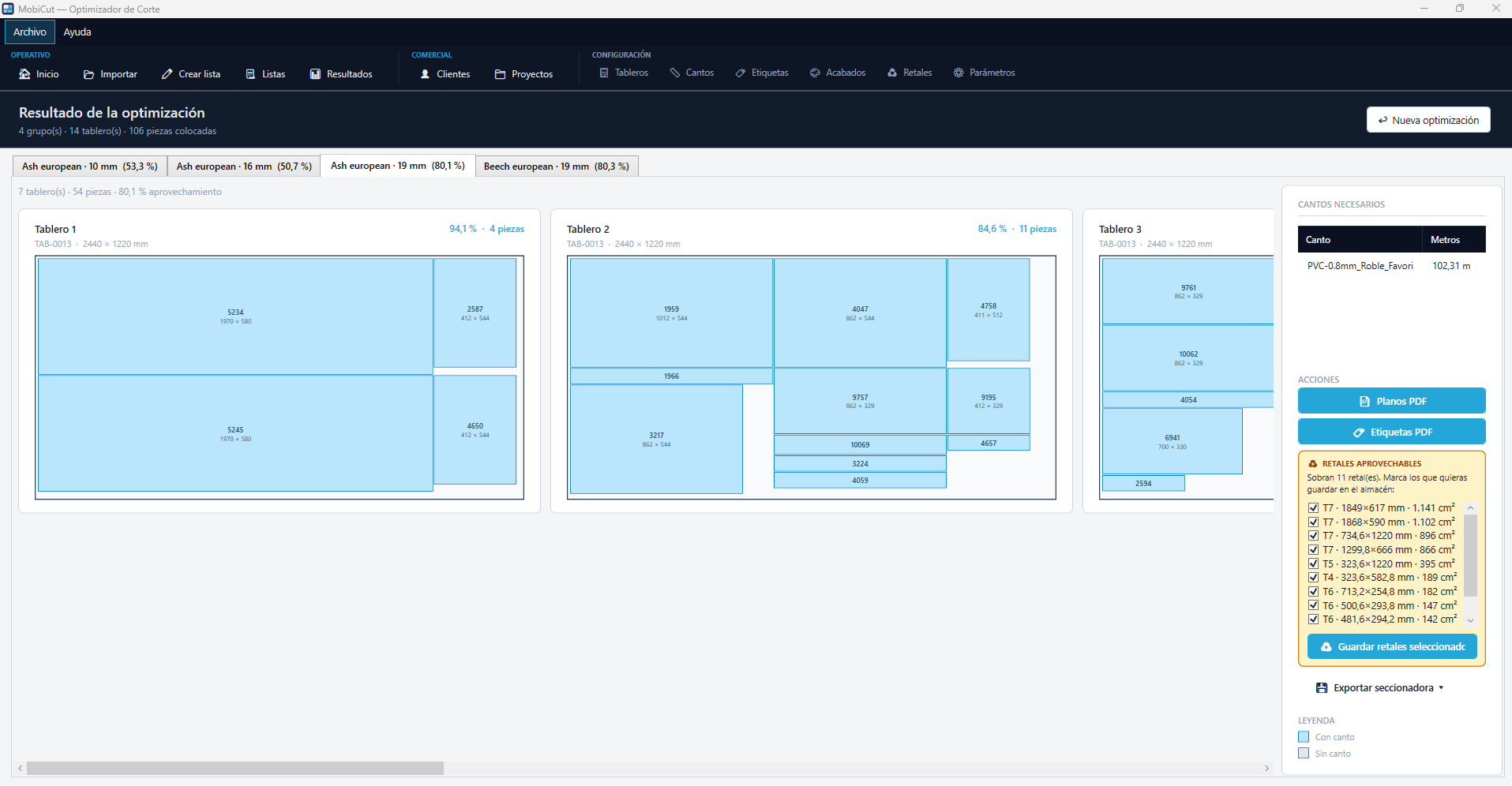
The two most important functions, included in the licence, are the ones that handle the difficult cases on their own.
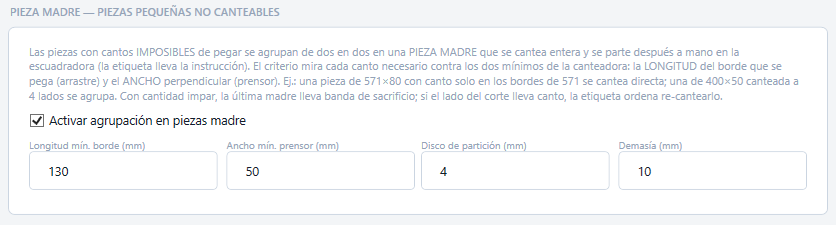
Parent part: parts too small for the edgebander
Every edgebander has two physical limits: the minimum length of edge it can feed through and the minimum part width the top pressure can hold. A part below those limits cannot be edged on its own.
In MobiCut the function is switched on once in the settings, with your edgebander's two minimum dimensions. With them, the program checks every part, taking into account which sides are edged. For example, with a minimum length of 130 mm and a minimum width of 50 mm, a 571 × 80 mm part edged only on its long sides is edged directly; if it is also edged on its 80 mm sides, it is not. MobiCut pairs up the parts that cannot be edged on their own — identical parts, two by two — into a parent part: a larger part that is cut on the panel saw, edged all round and then split on the sliding table saw. The two parts sit on the outer edges of the parent part, so their edges come out of the edgebander like those of any other part.
The label tells the operator that the part has to be split and, if the cut side is edged, that it has to be edged again. The edgeband metres in the result already include the whole parent part and those re-edged sides.
Continuous-grain cluster: the grain runs from one part to the next
Think of the fronts of a chest of drawers with vertical grain. If each front comes from a different spot on the board, the grain jumps from one drawer to the next and the piece looks patched together. For the grain to run from one front to the next, the fronts must come from the same board, one after another in the direction of the grain and in the order they are fitted.
In MobiCut those parts form a continuous-grain cluster. The cluster is defined by hand in the list, with a button, or automatically, when the list arrives from TopSolid'Wood with the cluster already marked. The fronts can have different heights; what they must share is material, thickness and width. The optimiser places the cluster parts in sequence, in the direction of the grain and without rotating them, and each part's label states its position in the sequence. If the cluster does not fit on the board in one piece, it is split into sections that do fit, the grain stays continuous within each section, and the program flags it.
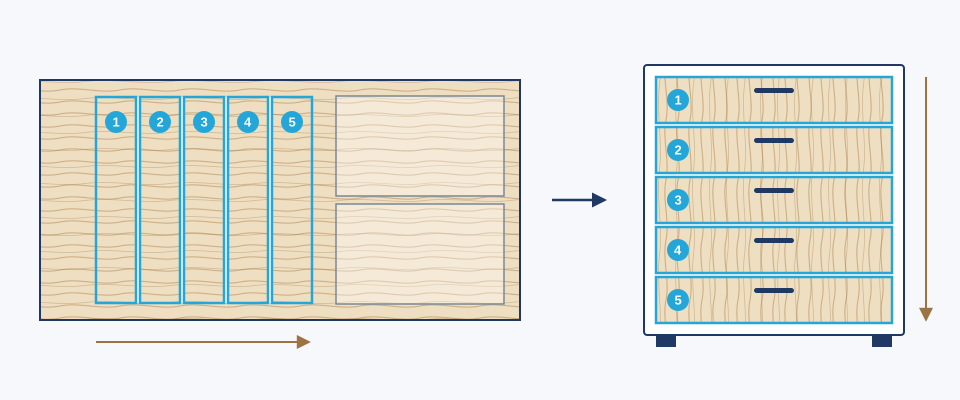
That is why the grain rule is not a detail: because the first dimension of every part is always the one that runs with the grain, MobiCut knows without asking how to place each part on the board and in which direction to line up the parts of a cluster. The user does not have to think about anything: the program does it all.
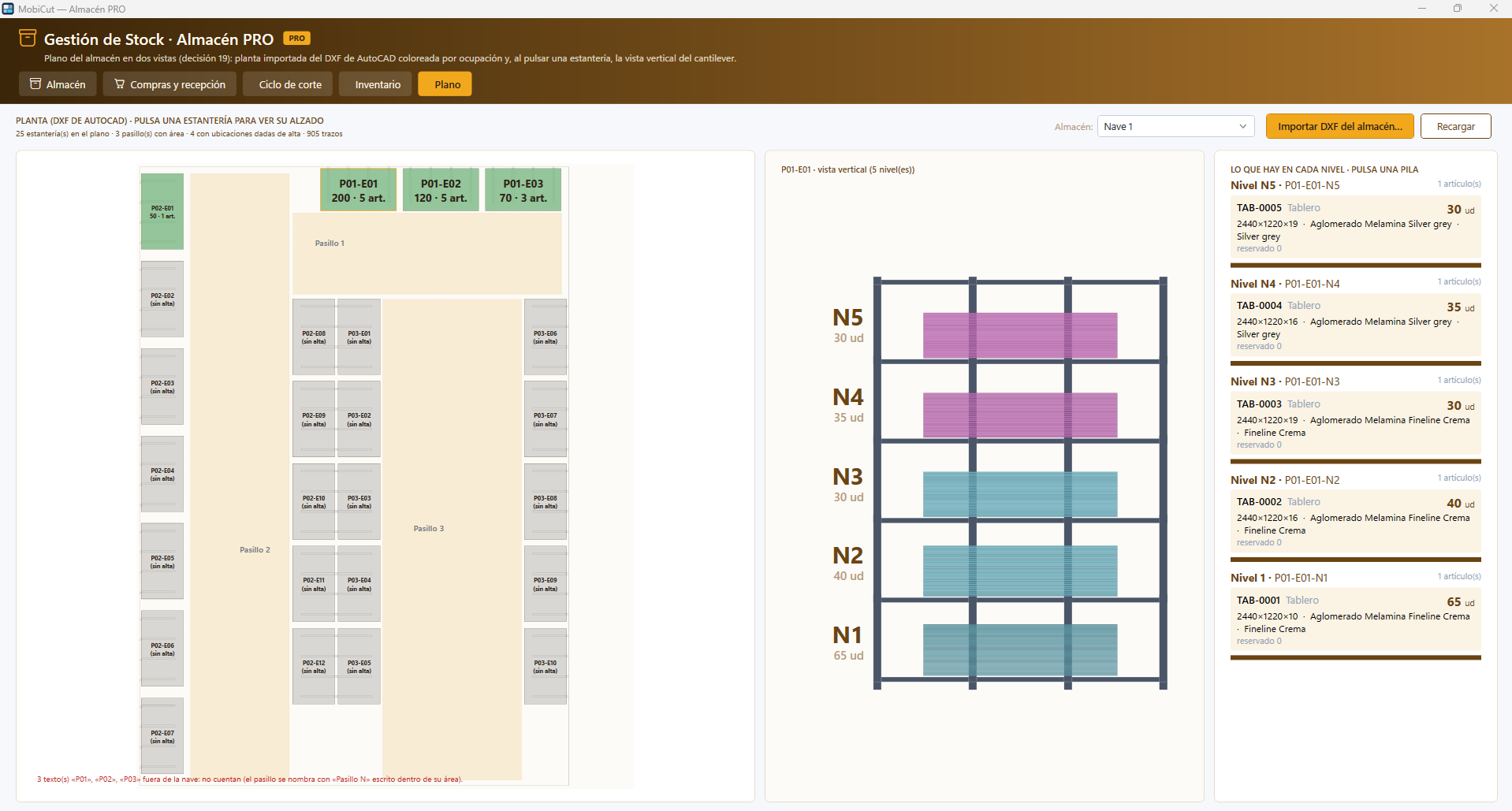
Warehouse PRO: everything in its place
With the Warehouse PRO module, which has its own licence, MobiCut moves into stock management. The building plan is imported as a DXF, with its aisles and racks, and each rack is shown by level: which board is on each level, how many units and how many of them are reserved. Every receipt and every issue of material is recorded in a movement ledger, with the scanner reading first the location and then the item.
And the cutting list is connected to the warehouse: boards are reserved when optimising, what is actually cut — boards and metres of edgeband — is issued when the labels are printed, and leftovers are stored according to the policy each company chooses. Stocktaking is done with the scanner, aisle by aisle, and anything that drops below the minimum becomes a purchase order.
And if what you need is to manage the whole factory, from quote to shop floor, the MobiTech ERP includes its own cutting optimiser. What else that ERP should do is covered in the 7 key questions for choosing an ERP for a furniture factory.
Before sending the list to the workshop
- Does every part have an ID and a description?
- Do all dimensions follow the same finished-size criterion?
- Is the grain stated, with the first dimension following the grain?
- Are the edges marked side by side?
- Are the fronts that need continuous grain in their cluster, in the order they are fitted?
- Do the material and thickness match the boards in stock?
- Did the list come out of the design without being copied by hand?
If the answer to all of them is yes, the list is ready to optimise. If you want to see how MobiCut turns your list into optimised boards and labels for every part, request a demo with your own files.